TREE AGE & PLANTS

Plant ID

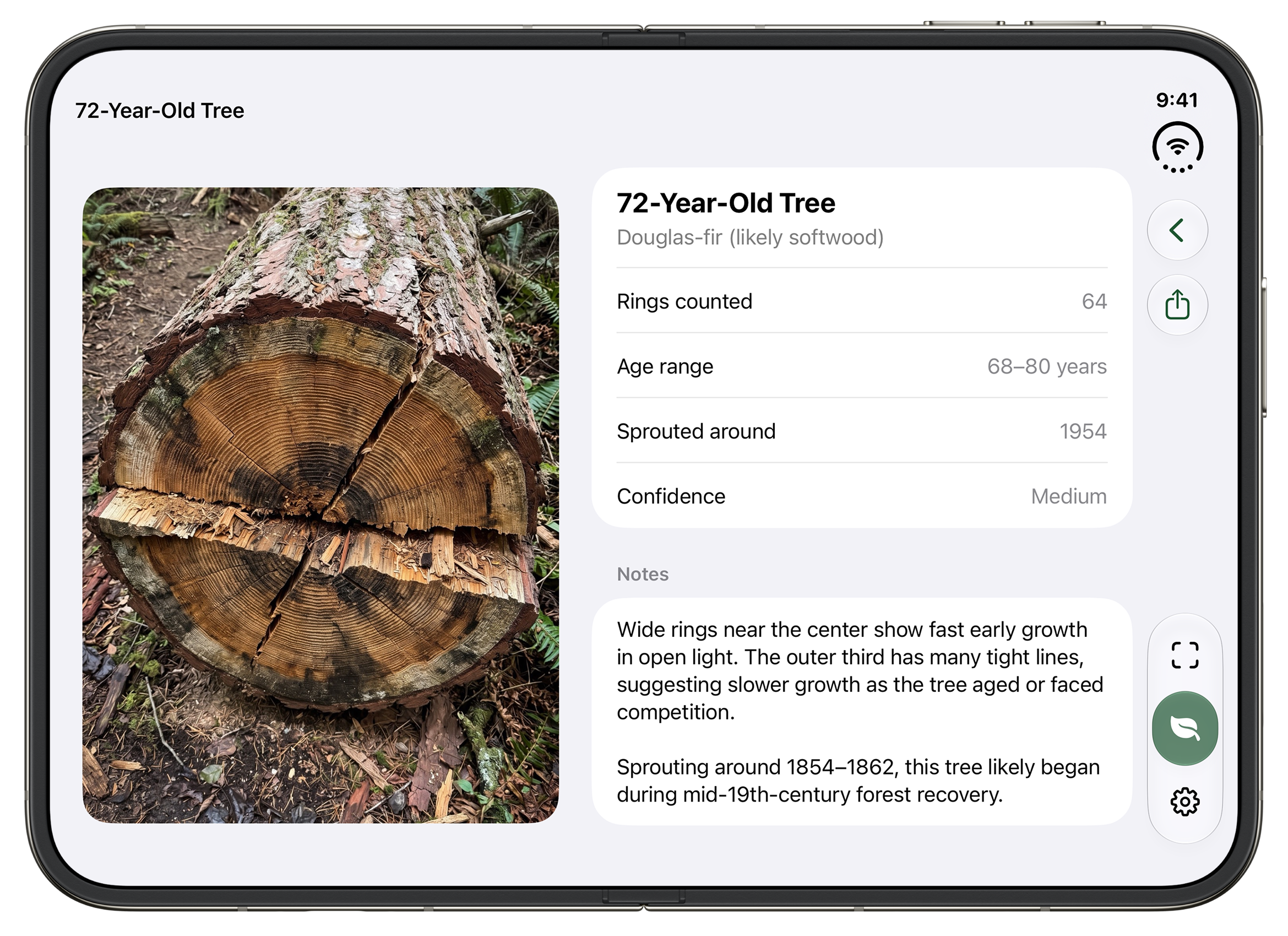
Free AI plant identification and tree age from rings. Snap a stump’s rings to find out how old a tree is. Snap a leaf, flower, or bark to identify any plant for free on iPhone with Apple Intelligence.

Download on the App Store
Plant ID camera on iPhone and iPhone Duo — counting tree rings and identifying a fern

WHAT PLANT ID DOES

FEATURES

CAMERA CONTROL

Open Plant ID in a click with Camera Control.

On iPhone 16 and newer, assign the Camera Control button to launch straight into Plant ID’s camera so you are ready to identify rings or plants in seconds.

How to set it up on your iPhone:

STEP 1

Open Settings

Open the Settings app on your iPhone.

STEP 2

Camera Control

Tap Camera, then select Camera Control.

STEP 3

Choose Plant ID

Select Plant ID from the list of camera tools.

You can also assign Plant ID to your Lock Screen controls or the Action button for quick access anywhere.

PRICING

Try it free. Go Unlimited when you need more.

Free

Free download on the App Store. Includes one camera tree-ring scan per week to determine tree age, with zero ads, zero trackers, and complete privacy.

Plant ID Unlimited

  • Unlimited tree ring & plant identification scans
  • Species identification, care tips, and look-alikes
  • Scan from your iPhone photo library & batch scans
  • Custom accent colors, title fonts, and alternative app icons

$0.99/month or $4.99 lifetime

Auto-renewing monthly; cancel anytime. Manage in Apple Account settings or Settings ▸ Plant ID Unlimited.

Ring counts and plant identifications are estimates. Never eat or handle a plant based on an app’s identification.

Private analysis. Nothing collected.

  • No accounts, no ads, no tracking, no analytics
  • App Store privacy label: Data Not Collected
  • Garden and settings sync in your private iCloud
  • Purchases go through the App Store only

Analysis uses Apple’s private cloud — not on-device models alone. Read the privacy policy.

Frequently Asked Questions

Yes, Plant ID is free to download on the App Store. Free users get a weekly camera tree-ring scan to find the age of any tree, with no ads and no tracking. You can upgrade to Plant ID Unlimited anytime for unlimited plant identification, photo library uploads, and advanced features.

Plant ID uses cutting-edge Apple Intelligence running securely with Apple’s Private Cloud Compute. Snap a photo of a cut stump or wood slice to count its growth rings and estimate its age, or snap a leaf, flower, or bark to identify the species, botanical name, and plant care tips.

Plant ID needs an Apple Intelligence iPhone on iOS 27 or later, with Apple Intelligence turned on in Settings, and an internet connection. Analysis runs on Apple’s Private Cloud Compute.

iOS 27 or newer is required iPhone 15 Pro or newer with Apple Intelligence enabled iPhone only

Yes. On iPhone 16 and newer models with Camera Control, open Settings ▸ Camera ▸ Camera Control and select Plant ID. Once set, pressing Camera Control launches straight into Plant ID’s camera so you can identify tree rings or plants instantly. You can also assign Plant ID to your Lock Screen controls or the Action button.

Plant ID is not available in the EU due to the European Commission’s bizarre stance on competition, often making it so their citizens get fewer choices. Apple Intelligence is unfortunately not available in the EU.

Plant ID counts the rings on the cut face and builds a confident age range from that count, including a few years for growth before the tree reached that height. On a clear, flat, well-lit cut, results are typically very close. Cracks, rot, or blur can make the range a bit wider.

Fill the frame with the cut face, shoot straight on, use good light, and avoid saw marks covering the rings.

Plant ID Unlimited includes: • Unlimited scans • Plant identification and care tips • Scans from the photo library, including batches • Every accent color, title font, appearance option, and app icon Free includes one camera tree-ring scan per week.

Cancel in Apple Account settings, or from Settings ▸ Plant ID Unlimited ▸ Cancel Subscription in the app. Restore Purchases is on the Unlimited page. Apple’s subscription help: https://support.apple.com/HT202039

Yes. With iCloud turned on, the Garden and settings sync across iPhones signed into the same Apple Account. Sync is optional.

Photos are analyzed with Apple Intelligence on Private Cloud Compute for your request and are not stored. The developer collects no data — no accounts, ads, tracking, or analytics. The Garden stays on your device and in your private iCloud.

Apple Intelligence has a daily request allowance. When you hit it, wait for the allowance to reset.

English, French, German, Hebrew, Japanese, Korean, Mandarin Chinese, Portuguese, and Spanish.

Count the rings. Name the leaf.

Free download on the App Store with optional Plant ID Unlimited.

Download on the App Store